FC 27 TAX CALCULATOR
Calculate EA's 5% transfer market tax, net profit, break-even sell price, and profit margins with surgical accuracy.
How EA's 5% Transfer Market Tax Works
Every single card sold on the EA FC Ultimate Team transfer market is subject to a mandatory 5% platform fee. Understanding this is the difference between profitable trading and running a losing operation.
Flat 5% Fee
EA deducts exactly 5% of the gross sell price before crediting coins to your account — no exceptions, no tiers.
Break-Even Formula
Break-even sell price = Buy Price ÷ 0.95. Buy at 9,500 → you must sell for at least 10,000 to recover your coins.
Scales With Value
On a 1,000,000 coin sale you lose 50,000 coins to tax. This makes profit-margin planning critical for big-ticket flips.
Cannot Be Avoided
The 5% fee is built into EA's marketplace. No workaround exists — your only lever is buying low enough to absorb it.
The Math — Simplified
Sell Price
100,000
Gross coins listed
EA 5% Tax
−5,000
Deducted by EA
You Receive
95,000
Net coins to club
Net Received = Sell Price × 0.95 | Break-Even Sell = Buy Price ÷ 0.95
FC 27 Transfer Market Tax Reference Table
Quick-reference deductions and break-even thresholds across common FC 27 coin tiers.
| Gross Sell Price | 5% EA Tax | Net Coins Received | Break-Even Buy Ceiling |
|---|---|---|---|
| 10,000 | −500 | 9,500 | 9,500 |
| 25,000 | −1,250 | 23,750 | 23,750 |
| 50,000 | −2,500 | 47,500 | 47,500 |
| 100,000 | −5,000 | 95,000 | 95,000 |
| 250,000 | −12,500 | 237,500 | 237,500 |
| 500,000 | −25,000 | 475,000 | 475,000 |
| 1,000,000 | −50,000 | 950,000 | 950,000 |
| 2,000,000 | −100,000 | 1,900,000 | 1,900,000 |
Pro FUT Trading Tips Using This Calculator
Always Calculate Break-Even First
Before buying any card to flip, use the calculator to find the exact break-even sell price. Never guess — a 5,000 coin mistake on a bulk flip erases hours of profit.
Target ≥15% Gross Margin
After EA's 5% cut, your real margin shrinks. Aim for a minimum 15–20% gross margin on your sell price so your net profit stays meaningful after tax.
Use Quantity Multiplier
Buying the same card in bulk? Enter the quantity. A 2,000 coin profit per card becomes 40,000 coins on 20 cards — the multiplier shows you if the grind is worth it.
Set Your Snipe Bot's Max Buy Below Break-Even
Your bot's max buy price should always sit well below the break-even threshold. Leave at least 10% headroom above break-even as your profit floor before starting the bot.
See It Live — Real Console Log
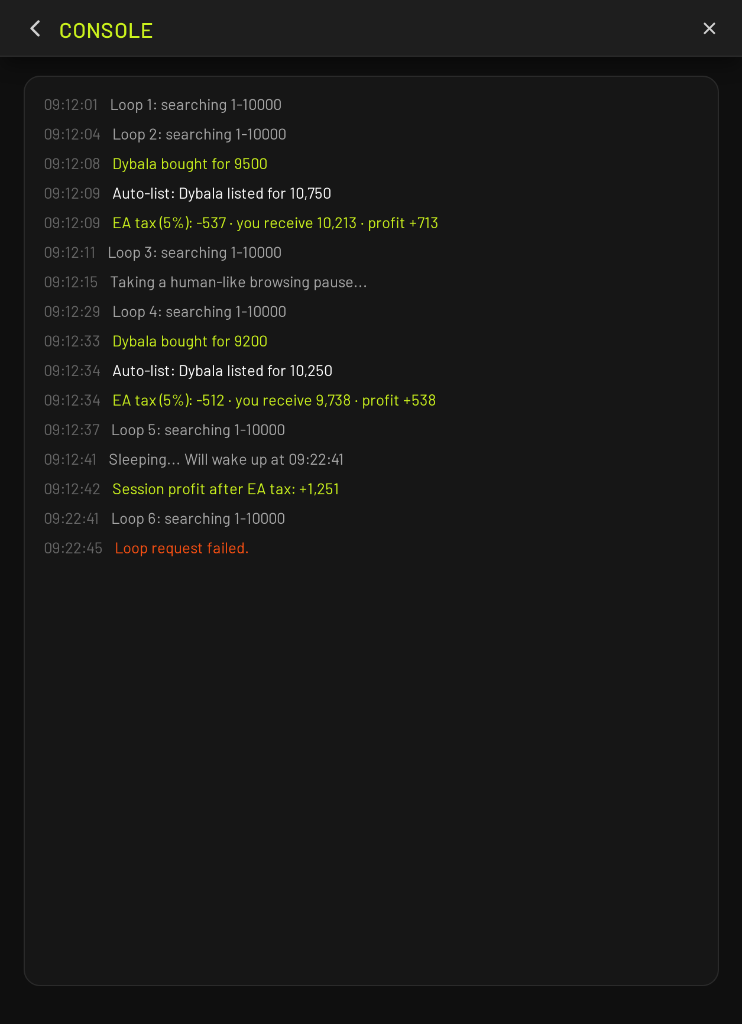
This is a real Elite FUT SNIPER console session. Every line proves the bot calculates the 5% EA tax, auto-lists, and tracks net profit — automatically.
2
Cards Bought
−1,049
EA Tax Paid
+1,251
Session Profit
Real session. Dybala sniped twice at 9,500 and 9,200 coins. Auto-listed at 10,750 and 10,250. EA deducted 5% each sale. Bot logged net profit of +713 and +538 per card. Session total: +1,251 coins after tax.
Step 1 — Snipe
09:12:08 Dybala bought for 9500
Bot searches for cards where buyNowPrice ≤ your Max Price. Finds Dybala at 9,500 — fires Buy-Now instantly. Card lands in your Transfer List.
Step 2 — Auto-List Price Calculation
09:12:09 Auto-list: Dybala listed for 10,750
Bot calculates listing price: Buy Price (9,500) + Profit Margin (500) + 5% EA Tax (750) = 10,750. Listed immediately, no manual action needed.
Step 3 — Tax Deduction Logged
09:12:09 EA tax (5%): −537 · you receive 10,213 · profit +713
After the card sells at 10,750, EA deducts 5% (537 coins). You receive 10,213 coins net. Bot logs your actual profit: +713 coins after all deductions.
Step 4 — Human Pause (Anti-Ban)
09:12:15 Taking a human-like browsing pause...
Between searches the bot inserts a natural pause to simulate human browsing behaviour. Timing is randomised so your pattern never looks like a bot.
Step 5 — Sleep & Auto-Resume
09:12:41 Sleeping... Will wake up at 09:22:41
After the configured run interval the bot enters a sleep cycle to stay within EA's rate limits, then automatically resumes without any manual input.
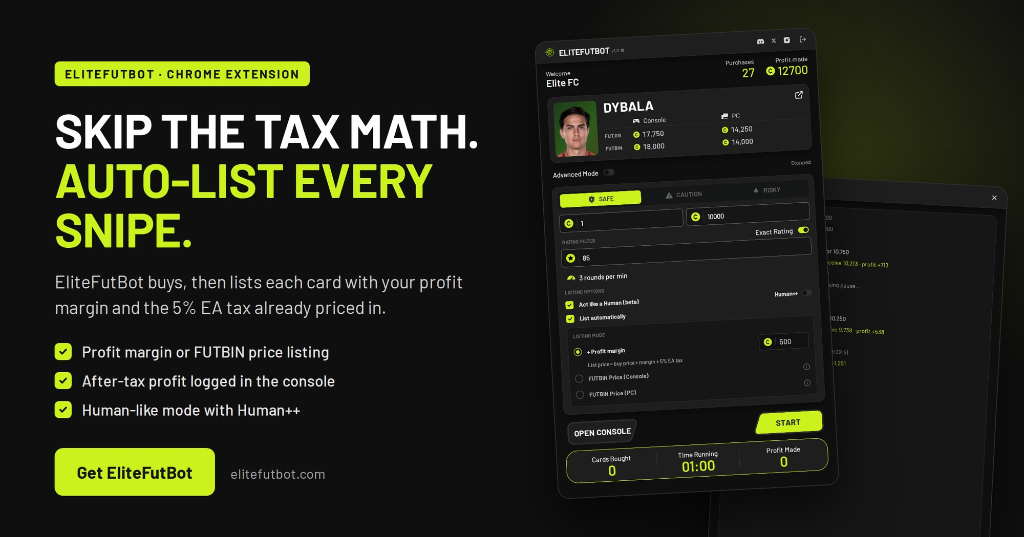
Skip the Tax Math. Let the Bot Handle It.
Elite FUT SNIPER is the only FC 27 Chrome extension that natively bakes the 5% EA tax formula into every buy, list, and profit calculation — automatically, in real time, inside the Web App.
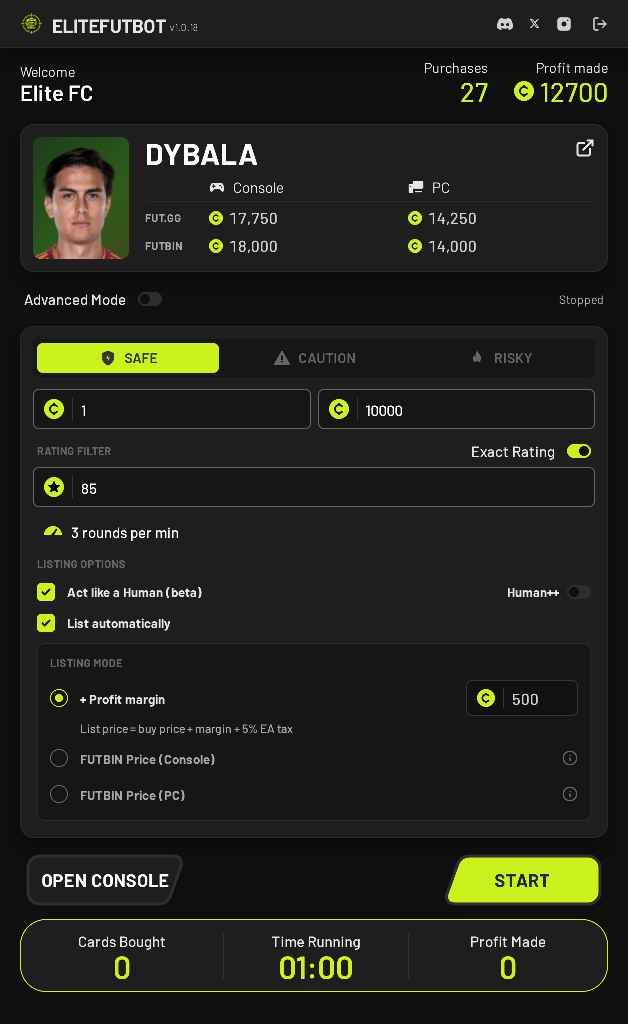
Simple Mode — Snipe & List in One Click
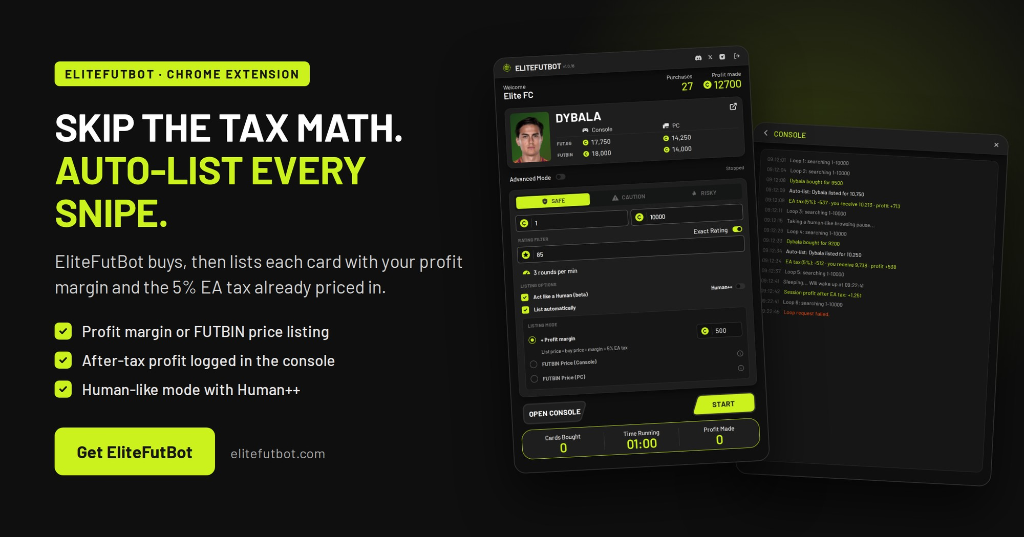
Set your target card (e.g. Dybala at Rating 85), choose a speed profile (Safe / Caution / Risky), and enable List automatically. The bot buys at your Max Price, then immediately lists at Buy Price + Profit Margin + 5% EA Tax — all pre-calculated, all tax-accounted.
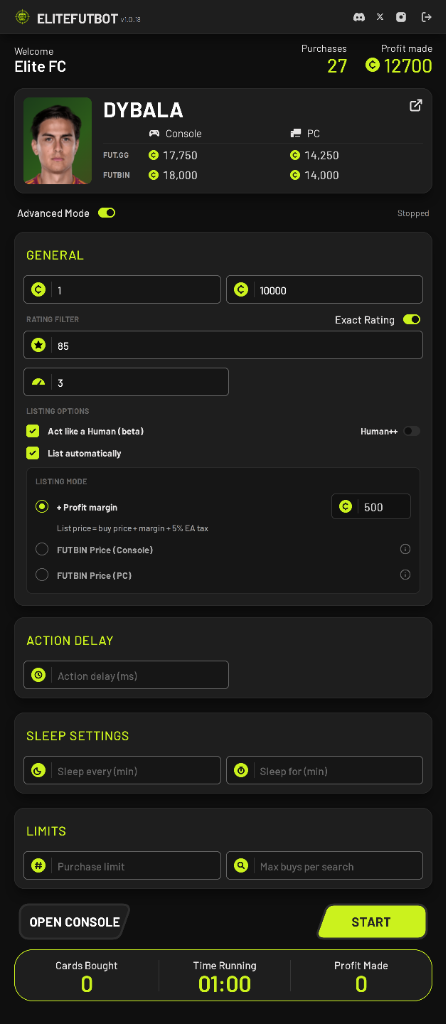
Advanced Mode — Full Control, Zero Guesswork
Unlock Action Delay, Sleep Settings, Purchase Limits, and Max Buys Per Search for precision session management. Every listing price is still tax-aware — the bot never lets you sell at a loss.
Auto-Snipe (Buy-Now)
Scans up to 10 searches/min, fires Buy-Now on the cheapest card matching your filters the moment it appears. Dybala at 9,500 → sniped in milliseconds.
Tax-Aware Auto-List
Listing mode = Buy Price + Margin + 5% EA Tax. The bot calculates the exact list price so your profit margin is guaranteed after EA's cut.
FUTBIN Console / PC Sync
Switch to FUTBIN Price mode and the bot fetches the live market rate for your platform (Console or PC) and lists at that price — tax floor still enforced.
Rating & Price Precision Filters
Filter by Exact Rating (e.g. 85), min/max Buy-Now, chemistry styles, or positions. Target exactly the card tier where your profit margins are strongest.
Safe / Caution / Risky Speed Profiles
Three pre-tuned profiles: Safe (3 RPM), Caution (6 RPM), Risky (9 RPM) with automatic sleep cycles and rate-limit protection built in.
Act Like Human + Human++ Mode
Randomised browse pauses, Bézier mouse curves, and natural scroll deceleration make the bot's fingerprint indistinguishable from a real trader.
Sleep Cycles (Anti-Soft-Ban)
Default: 15-min run then 5-min rest. Fully configurable — keeps sessions well within EA's acceptable usage window with zero manual intervention.
Live Session Logs & Profit Sync
Real-time console logs every snipe, auto-list, EA tax deduction, and net profit — so you always know exactly how much you made after tax.
10 RPM
Max search speed
5%
Tax auto-calculated
3
FUT accounts included
2 Days
Free trial — no card
Common FUT Tax Calculation Mistakes
Mistake
Setting Max Buy = Market Price
Fix
Set Max Buy = Market Price × 0.85 (leave ≥15% for the 5% tax + desired profit margin)
Mistake
Forgetting tax on both sides of a flip
Fix
You only pay tax when selling — buying is tax-free. The calculator correctly applies tax to the sell side only.
Mistake
Listing at your buy price
Fix
The bot prevents this — it ensures Start Price > buyNowPrice, so you never list at a guaranteed loss.
Mistake
Using console price on PC accounts
Fix
FUTBIN prices differ between PS/Xbox and PC. The extension lets you pick the correct platform — always match your FUT account platform.
Frequently Asked Questions
What is EA's transfer market tax in FC 27?
EA Sports charges a flat 5% fee on the gross sell price of every card sold on the Ultimate Team transfer market. This is applied automatically — you receive 95% of your listed price.
How do I calculate the break-even sell price?
Divide your buy price by 0.95. If you paid 9,500 coins, your break-even is 9,500 ÷ 0.95 = 10,000 coins. The calculator above does this automatically in real time.
How much tax on a 100,000 coin sale?
EA deducts 5,000 coins (5%) and you receive 95,000 coins net. To profit you need to have bought the card for less than 95,000 coins.
Does the 5% tax apply to loans, SBCs, or packs?
No. The 5% tax only applies to transfer market sales. Cards obtained from packs, SBCs, objectives, or loans do not incur this fee — only when you list and sell them on the market.
Can I avoid the 5% EA transfer market tax?
No — it is mandatory and unavoidable. The only way to stay profitable is to ensure your buy price is low enough that 95% of your sell price still exceeds it. Our sniping bot automates exactly this strategy.
What is a good profit margin target for FUT trading?
After the 5% tax, aim for at least 10–20% gross margin on your sell price. For example: buy at 85,000, sell at 110,000 → 5,500 tax, 19,500 net profit (a 23% gross margin on sell).
Does Elite FUT SNIPER calculate tax automatically?
Yes. The bot uses the same 5% tax formula internally when displaying session profit estimates and when calculating the safe listing prices on auto-list. You don't need to run calculations manually.
Every Snipe. Every Coin Accounted For.
You've got the calculator. Now get the bot that runs it automatically — sniping, listing at your profit margin with the 5% tax already priced in, sleeping between sessions, and logging every coin made. All from inside the EA FC 27 Web App.
No credit card required · Instant activation · 0 transfer market bans across 14,000+ sessions